The free Wispr Flow alternative for Mac

Speak it.
It's written.

Hold ⌃ Control, talk, let go — clean, punctuated text lands wherever your cursor is. English, Русский, Українська. No word limits.

macOS 14+ · Apple silicon & Intel · Updates itself

The Wow shouting O turning speech into lines of text
You said EN
Wow Work typed
Wow Work listening The Wow Work dock: language, microphone, timer and task
~1.7 s from voice to textUms & self-corrections removedMixed languages stay mixed
$0for the app, forever
∞words — no weekly cap
3languages, mixed freely
4-in-1dictation, breaks, focus, cleanup
One small dock, four superpowers

Everything you need to work out loud.

A minimal black dock lives on the edge of your screen. Hover for options, right-click for everything else. It stays out of the way until you need it.

Dictation

Dictate into any app

Mail, Slack, Notion, ChatGPT, your code editor — if there's a cursor, Wow Work types there. Hold to talk or go hands-free for long thoughts.

⌃ hold to talk
⌃⌃ hands-free
esc cancel
A key with the Control symbol being pressed

AI turns rambling into ready-to-send

Fillers vanish, your corrections are applied, punctuation is fixed. Your words, your tone — never translated.

um so uh can we meet on Tuesday at five, no wait, at six
Can we meet on Tuesday at six?

English, Русский, Українська

Detected automatically — even mixed in one sentence. Add names and brands to your dictionary so they're always spelled right.

Breaks that actually happen

30 minutes of focus, then a chime: stand up, rest your eyes. Starts when you open your work apps, pauses when you step away, and goes quiet until 8 AM when you call it a day.

One task that matters

Pin today's most important task. Wow Work nudges you every 10 minutes — quietly — until you tick it off.

Wow Work timer pill: pause, break, rest and stop

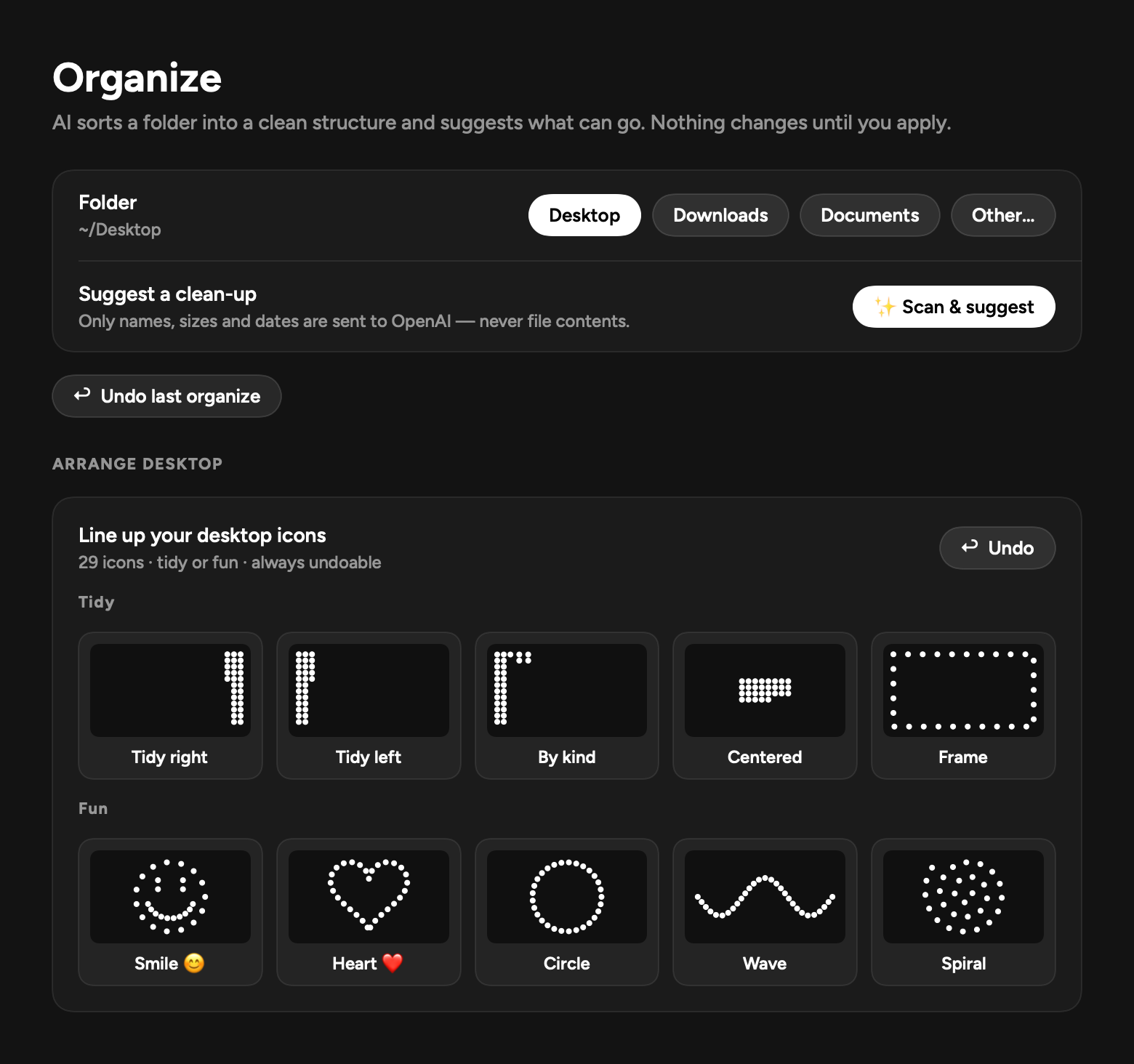
A messy Desktop, sorted in seconds

AI files everything into clean folders and flags duplicates and old installers. You review every change, deleted items go to the Trash, and one click undoes it all.

Wow Work desktop layouts: tidy grids, smile, heart, circle, wave, spiral
Just for fun

Icons in a smile

Line up your desktop icons in tidy grids — or a smile, heart, circle, wave or spiral. Because work can be fun.

Desktop icons arranged into a smiley face

Your history, your Mac

Every dictation is saved on your Mac with one-click copy — if a connection drops, the recording waits for you to retry. Audio goes to OpenAI only to become text. Organize sends file names, never file contents.

  • History and settings stay on your Mac
  • Failed dictations keep their audio — retry in one click
  • Your OpenAI key is stored in the macOS Keychain
  • Trash, not delete — and Undo for every clean-up
Wow Work vs Wispr Flow

Same flow. No subscription.

Wispr Flow is great — and $15 a month. Wow Work gives you the same hold-to-talk magic for free, plus tools Wispr doesn't have.

Wow WorkWispr Flow
PriceFree$15 / month (Pro)
Free-plan word limitNone2,000 words / week
Hold-to-talk & hands-free✓✓
AI cleanup of fillers✓✓
Break timer & eye rest✓—
Daily main-task reminder✓—
AI desktop organizer✓—

Wispr Flow prices from wisprflow.ai/pricing, October 2026 ($12/month billed yearly). Wispr Flow is a trademark of its owner; Wow Work is an independent app and isn't affiliated with it.

Pricing

Free app. Honest AI.

The app costs nothing. The AI that hears you runs on OpenAI — pick the way that suits you.

Invite code

$0

Got a code from a friend? Paste it in and you're done — the AI is on them.

Your own OpenAI key

~$0.006 / min of speech

Paste a key from platform.openai.com and pay OpenAI directly. Talking 30 minutes a day is about $5–7 a month — no cap, no middleman.

Up and running in a minute

Three steps. That's it.

Download

Open the download and drag Wow Work into Applications.

Open once

macOS asks to confirm the first launch: System Settings → Privacy & Security → Open Anyway. Only once — updates install themselves.

Get started

Paste an invite code or your OpenAI key, allow the microphone, then hold ⌃ and talk.

FAQ

Questions, answered.

Is Wow Work really a free Wispr Flow alternative?

Yes. The app is free with no word limits. The AI runs on OpenAI: activate with an invite code from a friend, or with your own OpenAI API key and pay OpenAI directly — about $0.006 per minute of speech.

Does it work in Russian and Ukrainian?

Yes. Wow Work recognises English, Russian and Ukrainian automatically — even mixed in one sentence — and never translates what you say. You can also lock a language in Settings.

How much does the AI cost?

With your own OpenAI key, about $0.006 per minute of speech plus a fraction of a cent for the cleanup. Talking 30 minutes a day comes to roughly $5–7 a month. With an invite code it's free for you.

Does it run on Intel Macs?

Yes — it's a universal app for Apple silicon and Intel Macs running macOS 14 Sonoma or later.

Why does macOS say it can't verify the app?

Wow Work isn't notarized by Apple yet. Open System Settings → Privacy & Security and click Open Anyway. You only do this once; updates install automatically after that.

What happens to my voice and my files?

Your recording is sent to OpenAI only to turn it into text. Your history and settings stay on your Mac. Organize sends only file names, sizes and dates — never the contents — and everything it removes goes to the Trash.

Which apps does it type into?

Any app with a text cursor — browsers, Mail, Slack, Telegram, Notion, Google Docs, ChatGPT, VS Code and more. Wow Work pastes the text for you, then puts your clipboard back.


Stop typing.
Start talking.

Free for Mac. No word limits. Set up in a minute.

Download Wow Work